Speed Up a Life: Pause, 1×–16× and Next Decision
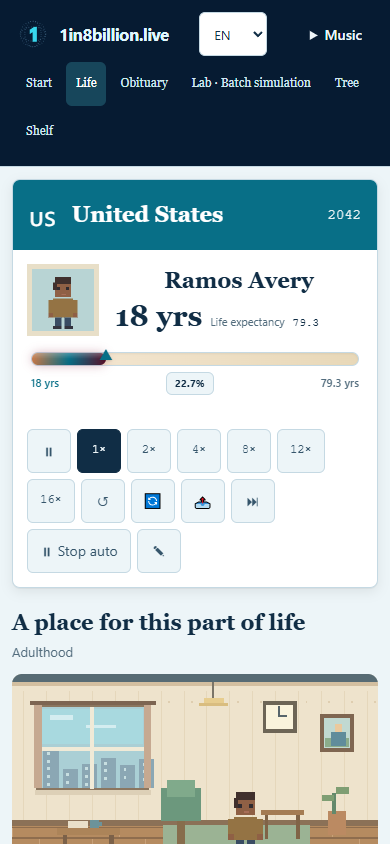
Use speed multipliers to shorten waiting, Pause to read, and Next decision to move toward a choice. Auto decides for you. There is no separate “next year” button in this version.
- Start and confirm a life. Locate the control row below the character’s details; on a phone you may need to scroll.
- Choose 1×, 2×, 4×, 8×, 12× or 16×. The active multiplier changes the tick interval. Quick is already a faster setup, so multiplier and starting pace both matter.
- Press ⏸ to stop the clock. Press the play icon again to resume. Raising speed while paused does not replace the need to resume.
- Use ⏭, titled Next decision, to fast-forward toward a decision. If a pending decision already exists, this control resolves it. It is not a guaranteed one-year step.
- Leave Auto off when you want to answer choices yourself. Turn it on if decision prompts, rather than elapsed time, are what you want to skip.
- Slow down again to inspect an event. A faster animation does not give a better statistical outcome; background-tab throttling may reduce the apparent speed.
Limits and troubleshooting
The game ends at a model outcome, not at a fixed viewing duration. Pausing and changing speed do not change the seeded automatic stream. Manually resolving a pending choice can make replay sharing ineligible.
Continue with a useful next step
Start a quick life · Full start-to-finish guide · Understand automatic decisions · Save or share the result
Reviewed 20 October 2026 · Independent project, not affiliated with 1in8b.life.
Sound, memories and returning
Music starts only when you press Play. The shared Music menu controls pause, mute, volume and optional event sounds. Switching away pauses playback. Your browser’s reduced-motion setting keeps scenes static.
At the ending, Save this memory PNG downloads an original illustrated card. Memory objects link to actual recorded milestones. Charts show stored samples, usually five years apart; gaps and missing values are not invented. Only eligible automatic lives offer Replay v1. Live again opens a new birth card for confirmation.
Recent lives stay on this browser: up to 50 summaries, with detailed memories for the latest 20 new lives. Clearing site data removes them. Older records keep their original summary. Continue resumes an unfinished save. Today’s shared life uses a UTC date and the same automatic seed and birthplace, with an explicit invitation before replacing a current life. Copy its invitation to let a friend play the same automatic story. There is no public leaderboard.